How to Properly Connect LED Strips to a Controller and Power Supply (A DIY Guide)
For DIY enthusiasts, there’s nothing more satisfying than transforming a space with LED strips — but incorrect wiring can burn out your strips, cause short circuits, or even create safety hazards.
Here’s a complete, practical guide: including real-case warnings, required materials, step-by-step wiring instructions, power supply calculations, common mistakes, and troubleshooting tips — everything you need to turn your project from a “pitfall” into a dazzling LED showcase.
A Real-Life Lesson
John bought a 16.4-foot (about 5.0-meter) LED strip for $30, eager to install it in his living room.Because he didn’t fully understand the voltage and wiring, incorrect connections burned out half the strip — a $15 loss, plus the hassle of reordering and waiting, delaying the project.

This case shows that a bit of electrical knowledge and proper preparation can prevent avoidable losses.
Preparation Checklist (Check Before You Start)
LED Strip: Check the working voltage on the label (usually 12V or 24V) and the power per meter/foot (W/m or W/ft).
Controller: Match the type of strip — single-color, CCT (tunable white), RGB, RGBW, or addressable controller.
Power Supply (Adapter): Voltage must match the LED strip, and rated power ≥ total strip power × safety margin (recommended 20–30%).


Wires: Use appropriate wire gauge (see current calculation and wire gauge recommendations below).
Tools: Electrical tape, multimeter, wire cutters, wire strippers, heat shrink tubing (recommended), etc.
Safety Gear: Insulating gloves, circuit breaker protection (especially for temporary testing), etc.

Understand the LED Strip Structure and Circuit Type First (Why It Matters)
There are two common circuit types for LED strips:
Series / Series-Parallel Hybrid (often found in older models or special LED arrangements):In a pure series circuit, a single point of failure can cause the entire segment to dim or go out.

Parallel (commonly used in modern strips):
Each segment receives the same voltage in parallel, so a local failure does not affect the rest of the strip.

Addressable / RGB Digital Strips:
These have individual pixel control chips (e.g., WS281x series). The controller and timing are more complex, and wiring and power requirements differ since each LED consumes current individually.
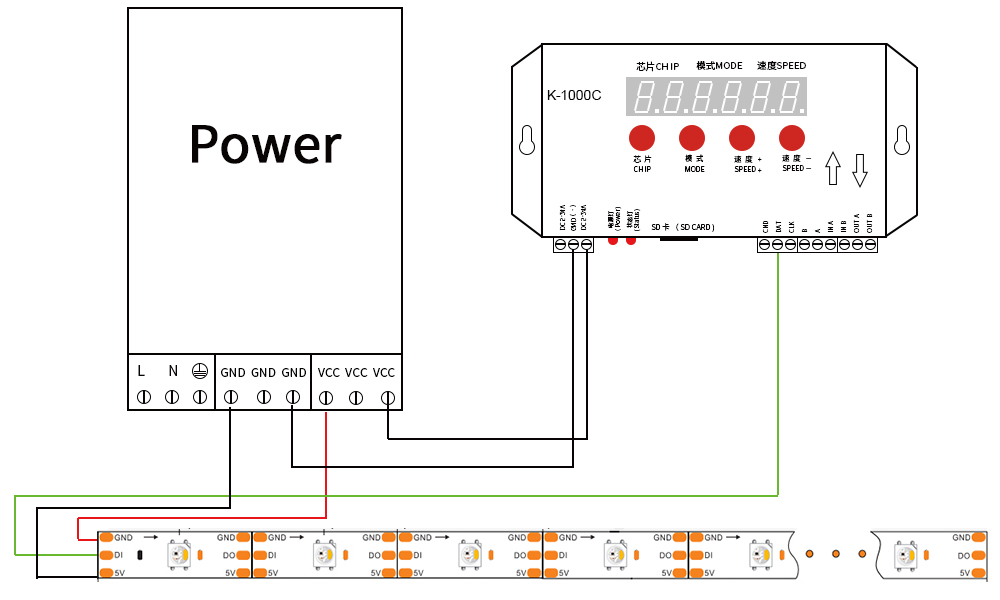
Knowing the internal structure of the strip is essential to determine the power supply method, whether multiple power injection points are needed, and the type of controller required.
Power and Current Calculation (Example with Step-by-Step Arithmetic)
Before installation, always calculate the total power and current to avoid selecting an underpowered supply that could burn out the strip.
Example (John’s Case): Strip Length: 16.4 ft ,Power per Foot: 4.8 W/ft (as provided by the user), Step-by-step arithmetic (to ensure accuracy):
- 16.4 × 4.8 = ?
- 16.4 × 4.8 = (164 × 48) ÷ 100
- 164 × 48 = (160 × 48) + (4 × 48) = 7680 + 192 = 7872
- 7872 ÷ 100 = 78.72 W (total strip power)
For a 12V strip: Current = 78.72 ÷ 12 = 6.56 A , For a 24V strip: Current = 78.72 ÷ 24 = 3.28 A
Power Supply Recommendation:
Total Power 78.72 W × suggested margin 25% = 78.72 × 1.25 = 98.4 W → choose a ≥100 W power supply (matching the voltage).
Conclusion: John’s original claim of “60W needed” was incorrect. The correct choice is about 100 W (or one tier higher) 12V power supply to ensure sufficient margin.
Wire Gauge and Conductor Selection (Rough Reference)
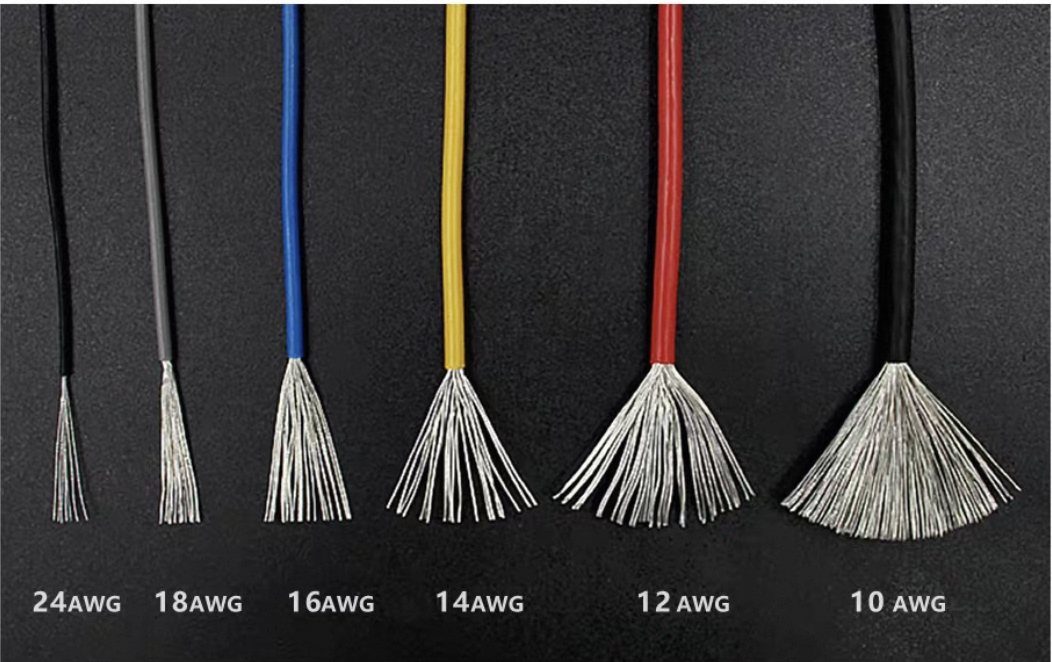
Low-voltage DC (12V/24V) is sensitive to current; wires that are too thin can overheat and cause significant voltage drop. Common recommendations (for reference only):
- < 5 A: 22–20 AWG (~0.3–0.5 mm²)
- 5–10 A: 20–18 AWG (~0.5–0.75 mm²)
- 10–15 A: 16 AWG (~1.0–1.5 mm²) or thicker
(For John’s 6.56 A on a 12V system, 18 AWG or thicker is recommended to ensure safety and reduce voltage drop.)
Step-by-Step Wiring Procedure (Example: 12V Single-Color Strip)
Power Off — Ensure the power supply is disconnected before starting any work.
Confirm Polarity — Check the strip’s solder pad markings with a magnifier; usually “+12V” or “+” is positive, “–” is negative.
Measure and Cut (if needed) — Cut along the marked cutting line on the strip.


Connection Method:
Solderless Connector: Insert the strip into the corresponding slot, press to lock, and check that the conductive clip contacts the pad.
Soldering: Strip the wires, solder carefully, and use heat shrink tubing for insulation (recommended).
Connect to Controller — Attach the strip’s output wires to the controller’s output, ensuring correct polarity and matching pin count.
Controller to Power Supply — Connect the controller’s power input to the power supply output, ensuring secure connections.
Power-On Test — Turn on the power, test a small section briefly for brightness and heat. If normal, proceed to fix the strip in place.
Additional Points for RGB / RGBW / Addressable (Digital) Strips
Different Pin Counts: RGB strips typically have 4 pins (R, G, B, +V), RGBW strips have 5 pins (+W), and RGBCCT / Addressable strips are more complex—always follow the strip’s labeled connections.
Controller: Use a controller matching the strip type (single-color controllers cannot drive RGB). Addressable strips usually require digital signals (single-wire or differential), so wiring and controllers differ from standard analog RGB.
Higher Power: Color strips can draw higher peak power at full white/full brightness. When calculating power, use the worst-case scenario (all channels at maximum).
Signal Distance & Attenuation: Wireless remote/control distance differs from amplifiers; for long strips, if the controller cannot reach, use a signal amplifier/regenerator or multiple parallel controller outputs.
Common Mistakes and How to Avoid Them (Practical Checklist)
Wrong voltage: Connecting a 24V strip to a 12V power supply (or vice versa) → strip won’t light up or may be damaged. Always check the label.
Insufficient power supply: Overloaded power supply causes overheating or voltage drop → choose a higher-rated power supply with margin.
Reversed polarity: Single-color strips usually won’t light; addressable strips may be permanently damaged.
Poor contact with solderless connectors: Unstable contact can cause flickering; recommend securing with heat shrink and strain relief.
Single-point power injection over long runs: 12V long runs may suffer voltage drop → use multiple power injection points.
Neglecting heat dissipation and enclosure: High temperatures in enclosed spaces can shorten lifespan → ensure proper heat dissipation and consider IP rating.
Simple Troubleshooting Flow
Not lighting up: First, measure the power supply output voltage with a multimeter; check whether the controller has a power indicator; verify that the polarity is correct.
Partially not lighting: Inspect the cut points and connector contacts to ensure proper connection; for addressable strips, check the data line connection and timing.
Flickering/color issues: Could be caused by insufficient power supply or poor contact; try using a higher-capacity power supply or redo the connections.
Abnormal heating: Immediately disconnect power and check for overload or short circuit.
Safety Precautions (Need To Follow)
Always disconnect the power before any wiring.
Choose a certified power supply (CE/UL, etc.) and ensure sufficient power margin.
If unsure about electrical work, seek assistance from a qualified electrician.
For outdoor or damp environments, use LED strips and connectors with appropriate waterproof ratings and ensure proper sealing.
During long-term testing, have someone monitor it and disconnect power immediately if any abnormalities occur.
Conclusion: Be Prepared and Enjoy the Results
Proper preparation and calculation ensure a smooth, worry-free DIY process. Don’t end up like John, losing out due to small mistakes:
- Read labels first to confirm voltage and W/length;
- Calculate total power and choose a power supply with at least 25% margin;
- Select appropriate wire gauge and certified connectors;
- For long strips, consider multi-point power injection and signal amplifiers;
Test, secure, seal, and finish properly.
Follow these steps, and you’ll turn your LED strips into a safe, stable, and stunning decoration.
If you like, I can provide a customized wiring and power supply selection chart based on your specific LED strip model (voltage, power per meter, length, waterproof rating). You can simply paste the specifications of your LED strip, and I’ll calculate everything and give you a wiring diagram right away. Contact Now!